


NJ TRANSIT Mobile App
3.18.07K Reviews
App Specs
- Version
- 2026.2.1.1A
- Updated On
- License
- Free
- Downloads
- 1,000,000+
- Developer
- NJ TRANSIT
- Categories
- Maps & Navigation
- Platform
- Android, iOS
Screenshots
 Analysis by AppCompare
For a New Jersey trip, I want one place to check the journey and handle the ticket, rather than juggling unrelated tools at the station. That is the practical appeal of the NJ TRANSIT app: it brings transit information and ticketing together, with train, bus, and light rail travel in view. I find it most useful when I treat it as a companion to a trip I have already thought through, not as a guarantee that every detail will remain unchanged while I travel.
A routine that works before and during the ride
My baseline workflow is simple: check the route before leaving, look at departure information again as the trip approaches, and keep the ticket task separate from the last-minute rush to board. That small habit matters more than tapping around repeatedly. A planned route gives me a reference point; a fresh look at service information helps me decide whether the original plan still makes sense.
For a regular commuter, the value is less about discovering a new route every morning and more about reducing little sources of friction. I can use the trip planner to orient myself, then turn to departure information and alerts when timing matters. On an occasional trip, I would spend more time checking the directions and transfer details before setting out. Either way, I would avoid assuming that a route result removes the need to pay attention to station signs and announcements.
Use tickets and trip planning as separate steps
Ticketing in the app can spare me the need to handle a ticket purchase at the station, but I would not leave the purchase until the moment I am trying to board. My practical approach is to work out the journey first, then deal with the ticket while I still have a little breathing room. That makes it easier to notice whether I have selected what I intended, rather than making a rushed choice in a crowd.
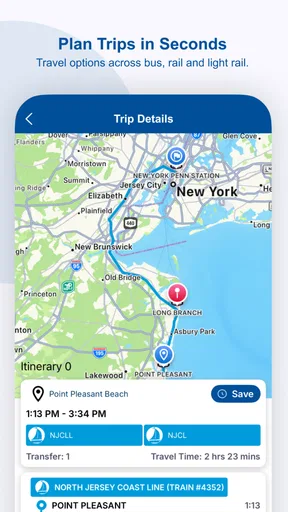
The trip planner is useful for seeing how a journey fits together, especially when a transfer is involved. I would check the complete route rather than focusing only on the first departure: a connection can shape the whole trip, and a small change early on may affect what follows. For a familiar journey, I can use the planner as a quick confirmation. For a new destination, I would leave extra time to understand the suggested steps instead of treating the first result as a complete travel briefing.
Making the app fit the way you travel
I’d use this section to make the app work around the journeys I actually take, rather than treating every ride as a fresh planning exercise. A consistent order—check the route, review service information, then handle the ticket—can make a familiar commute calmer while leaving room to adjust when conditions change. That routine also makes it easier to decide which settings and alerts deserve my attention.
Settings and habits worth checking
I would start by checking the app’s settings and notification choices, then keep only the alerts that help me make a decision. Notifications are most useful when they tell me something relevant to a trip I might take; too many prompts can become background noise. Before a journey where timing is important, I would also make a deliberate habit of opening the app and checking the current information rather than relying on an old screen or memory.
Worth Reading Before You Choose

EA SPORTS FC Mobile 26 Is a Bigger Football Game, but It Takes Time

Flipboard Shows What News Apps Must Do Beyond the Feed

Switching to Android Auto Means Rethinking Your Driving Routine

Google Calendar Makes a Crowded Week Easier to Manage

Ludo King Makes the Most of the Minutes Between Plans

Baby Panda World Brings Quick Play to Modern Phones, but Its Game Library Feels Busy
A useful low-effort shortcut is to repeat the same sequence each time: plan, check the service, sort out the ticket, and review alerts when departure is near. This is not a hidden feature; it is a way of using the available tools in a dependable order. It also helps me notice which part of the trip needs attention. If the route is familiar but service conditions have changed, I can focus on the update instead of starting the whole planning process again.
On a day when I need to make a connection, I would check the route before leaving home and revisit service information before the first leg. If an alert changes my expectations, I can pause and reconsider the plan while I still have options. I would not wait until I am already at the transfer point to find out that I need to rethink the journey. The app can support that decision, but the useful part is the habit of checking at sensible moments.
Where it beats general map apps—and where it doesn’t
Compared with a general map app, NJ TRANSIT’s main advantage is its focus on the state’s transit services and its built-in ticketing. A map tool can be handy for comparing a wider mix of ways to get somewhere or orienting myself around an unfamiliar area. For a journey that depends on NJ TRANSIT routes, however, I would rather start with the agency’s own app for its transit information and then use a general map as a supplementary view if I need broader directions.
That distinction matters most when a trip includes several decisions. A general map may be the quicker first stop if I am comparing walking, driving, and public transport. The NJ TRANSIT app makes more sense when I already know I want to use its services and need to plan the ride or handle a ticket. I would not expect either type of app to remove the need to verify the live situation when a delay or service change could affect my plans.
Good fit, with a few limits to keep in mind
I would recommend the app to people who regularly use NJ TRANSIT, and to occasional riders who want a single place to plan a transit trip and manage ticketing. It can also help someone unfamiliar with the system get oriented through its trip-planning and “How to Ride” material. Someone who rarely travels by NJ TRANSIT and mainly needs a broad city map may get more value from a general navigation app, using this one when a specific NJ TRANSIT trip calls for it.
My main caution is that live information is a planning aid, not a promise that the trip will unfold exactly as shown. The published review experience also notes that real-time accuracy can have hiccups. When a connection is important, I would build in a sensible margin, keep an eye on alerts, and pay attention to station information as well. That is a more realistic way to use a transit app than assuming a screen update settles every question.
The app is free and is developed by NJ TRANSIT. It sits in the maps and navigation category, has an Everyone age rating, and has been available since April 24, 2013. Its current version is 2026.2.0A. Its average rating is 3.3 from around 18,000 ratings, with about 8,000 reviews and over a million installs. Those figures suggest plenty of people have tried it, while the middling average is a reminder that a useful core purpose does not mean every rider will find every part seamless.
Getting Started with Ease
First things first, downloading the NJ TRANSIT Mobile App is a breeze. It’s available on both Android and iOS, so you’re covered no matter your device preference. Once installed, the app greets you with a clean, intuitive interface that’s easy to navigate. If you’re like me and sometimes find tech a bit overwhelming, fear not—this app is surprisingly user-friendly.
Key Features to Note
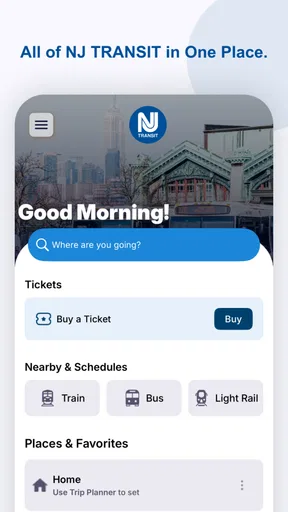
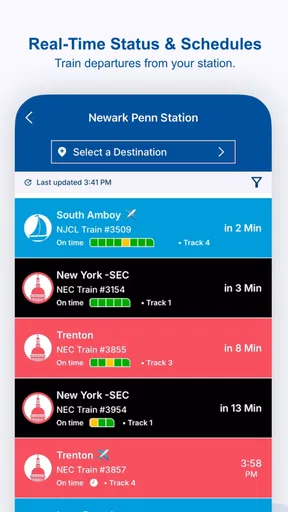
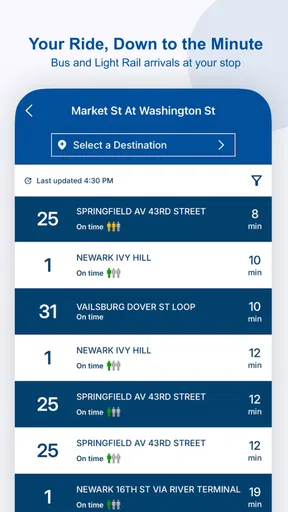
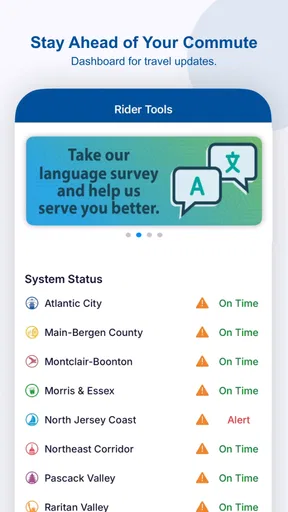
Let’s dive into what this app offers. The main screen is your hub, showing you real-time updates on train schedules, bus routes, and even light rail options. One feature I found super handy is the live departure information. You can see exactly when your train is arriving, which is a lifesaver if you’re trying to catch that last-minute ride.
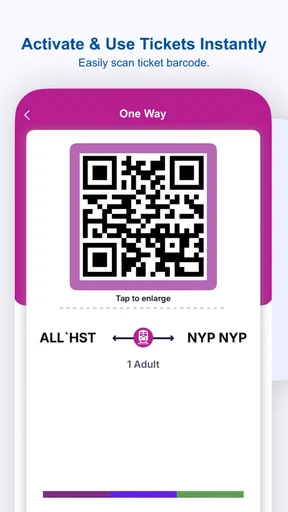
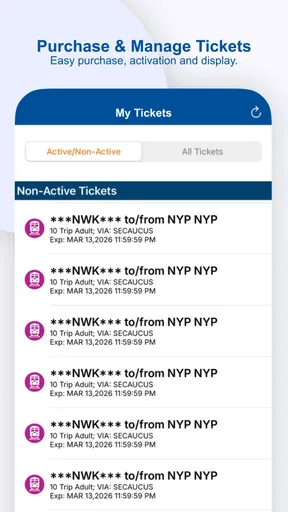
Another cool aspect is the built-in ticketing system. No more fumbling around for cash or cards at the station; just purchase your tickets directly through the app. It even supports mobile payment options, which is a huge plus in today’s tap-and-go world.
Smooth Navigation
I’ve got to give props to the app’s navigation tools. The trip planner is pretty slick, helping you map out your journey with minimal stress. You simply enter your starting point and destination, and it gives you detailed directions, including any necessary transfers. It’s like having a personal travel guide right in your pocket.
For those who are new to public transit, the app also offers a helpful "How to Ride" section. This feature breaks down everything from understanding schedules to finding your way around different stations. It’s perfect for easing any first-time jitters.
Stay in the Know
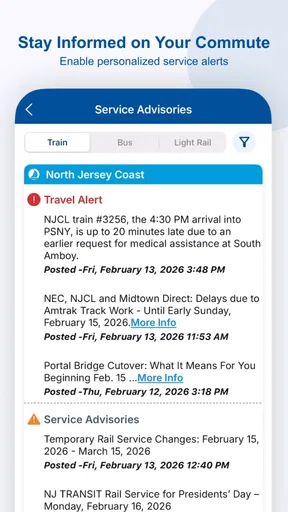
One thing I appreciate about the NJ TRANSIT Mobile App is how it keeps you informed. There’s nothing worse than being stuck on a delayed train with no idea what’s going on. The app provides real-time service alerts and notifications, so you’re always in the loop. Whether it’s a weather-related delay or a track maintenance issue, you’ll get the heads-up you need.
Plus, there’s a section for news and updates about NJ TRANSIT, which is great for those who like to stay informed about service improvements and changes.
Overall Experience
Now, let’s wrap this up with my overall thoughts. The NJ TRANSIT Mobile App is a solid tool for anyone navigating New Jersey’s transit system. It’s packed with features that make commuting a much more pleasant experience. From buying tickets to planning trips and receiving timely updates, it covers all the bases.
Sure, there might be a few hiccups now and then with real-time data accuracy, but hey, no app is perfect. Overall, I’d say if you’re a regular on NJ TRANSIT, this app is definitely worth a download. So, what are you waiting for? Give it a try and see how it changes your commuting game!
Pros
- Real-time transit updates enhance planning.
- Intuitive interface simplifies navigation.
- Mobile ticketing streamlines boarding process.
- Customizable alerts for personalized notifications.
- Supports multiple payment options for flexibility.
Cons
- Occasional app crashes can disrupt usage.
- Limited offline functionality restricts access.
- Some routes lack detailed schedule info.
- Push notifications can be inconsistent.
- Map features can be slow to load.
FAQs for NJ TRANSIT Mobile App
What features does the NJ TRANSIT Mobile App offer?
The NJ TRANSIT Mobile App provides a range of features, including real-time train and bus schedules, service alerts, and the ability to purchase and display tickets directly from your device. Users can also plan their trips using the app’s integrated trip planner, which offers detailed routes and connections.
How does the ticket purchasing process work on the app?
Purchasing tickets on the NJ TRANSIT Mobile App is straightforward. After creating an account, users can select their travel routes, choose ticket types, and make payments using credit cards or digital wallets. Purchased tickets are stored in the app and can be activated just before boarding, making the process seamless and efficient.
Is the NJ TRANSIT Mobile App available for both Android and iOS?
Yes, the NJ TRANSIT Mobile App is available for both Android and iOS devices. It can be downloaded from the Google Play Store for Android users and the Apple App Store for iOS users. The app is designed to offer a smooth experience across both platforms.
Are there any additional costs or fees associated with using the app?
Downloading and using the NJ TRANSIT Mobile App is free. However, users will need to purchase tickets for travel. There are no additional fees for using the app’s features, such as the trip planner or service alerts, making it a cost-effective tool for commuters.
How reliable is the real-time information provided by the app?
The NJ TRANSIT Mobile App aims to provide accurate and up-to-date real-time information. While it generally offers reliable service alerts and updates, occasional discrepancies can occur due to unforeseen circumstances or technical issues. It's always a good idea to double-check information during peak travel times.


